Meeting Agenda Mind Map: Plan Efficiently
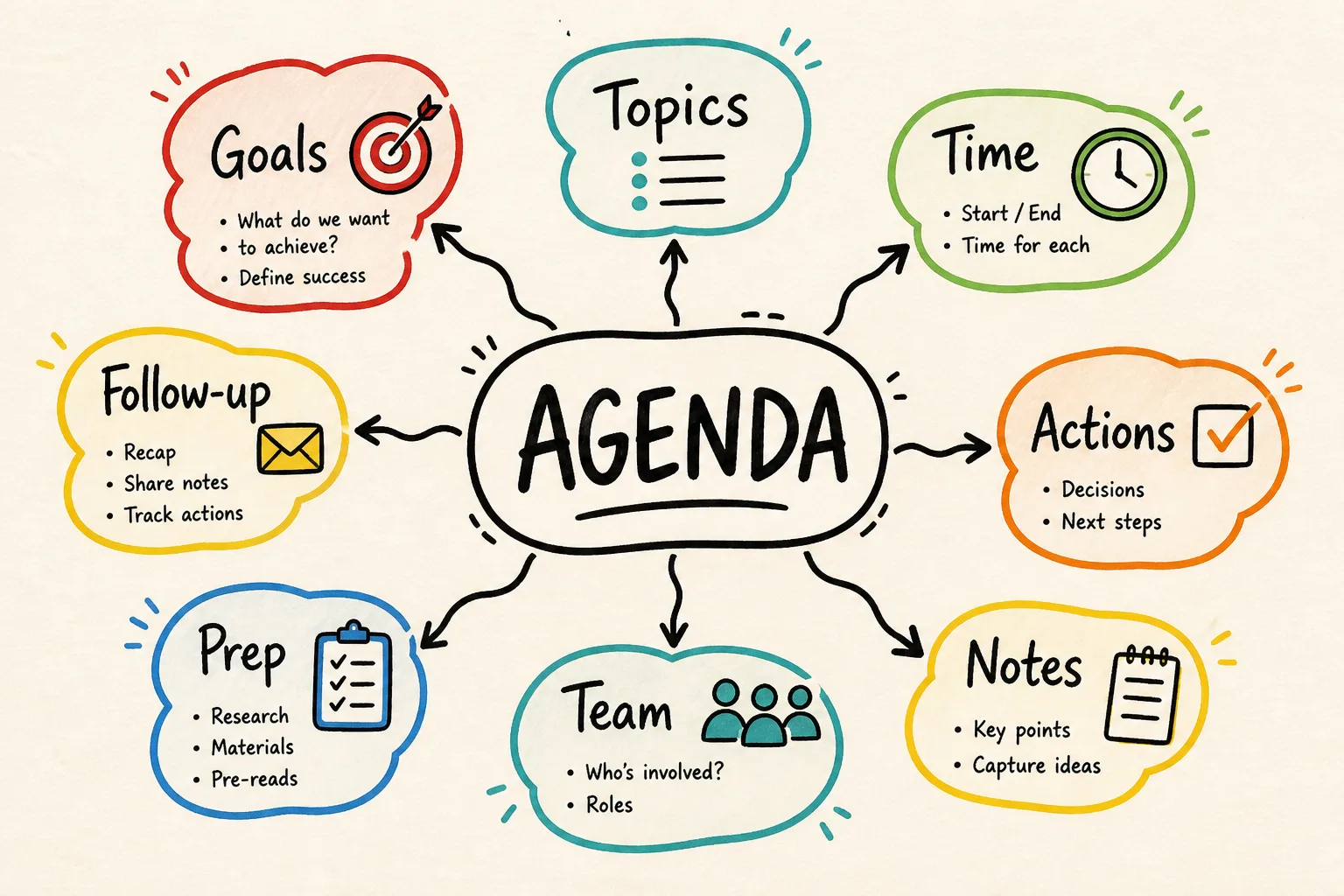
Efficient meetings are crucial for the success of any business. A well-structured meeting agenda helps maintain focus and ensures that all relevant topics are covered. Using a mind map, a meeting agenda can be organized in a visually appealing and easily understandable way. AI-MindMap by timeghost allows you to create such a mind map directly in Microsoft Teams and collaborate with your team in real time. In this article, you'll learn how to efficiently plan your meeting agenda using a mind map.
Why Create a Meeting Agenda as a Mind Map?
Creating a meeting agenda as a mind map offers numerous advantages. A mind map visually represents information, making relationships and priorities immediately clear. This results in:
- Structured Meeting Preparation: Through visual representation, topics can be easily grouped and structured. For example, in a product development meeting, main topics like "Market Analysis," "Product Features," and "Timeline" can be displayed as main branches.
- Quick Grasp of the Agenda by Participants: Participants can quickly adjust to the topics. This is particularly helpful when participants are informed at short notice.
- Flexible Adjustments During the Meeting: By adding nodes, spontaneous ideas or comments can be directly integrated.
- Encouragement of Creativity Through Visualization: The open structure of a mind map invites the development of creative solutions and new ideas.
How to Start Creating a Meeting Agenda Mind Map?
To create an effective meeting agenda as a mind map, you need a clear goal and the right tools. Getting started with AI-MindMap is easy and quick. Follow these steps:
- Define the Central Topic: Determine the main topic of the meeting. This will be the central node of your mind map. For example, for a weekly team meeting, the central topic could be "Weekly Updates."
- Identify Main Topics: Consider which main topics should be covered in the meeting. These form the main branches of the mind map. In a project meeting, these could be "Project Status," "Risks," and "Next Steps."
- Add Details: Add subtopics or key points to each main topic. Under "Project Status," for example, you might add "Completed Tasks" and "Current Challenges."
- Set the Order: Arrange the topics in the order they should be discussed. This helps guide the flow of the meeting and ensures that the most important points are addressed first.
How Does AI Support the Creation of Your Meeting Agenda?
AI-MindMap offers powerful features with its AI Assistant to quickly and efficiently create mind maps. The assistant can generate a complete mind map from a simple description, expand nodes, and revise structures. This saves time and ensures that no important points are overlooked. For instance, the assistant could automatically create a mind map from the description "Project Review Meeting focusing on Budget and Timeline," including both budget comparisons and timeline updates.
How Can Mind Maps Increase Meeting Efficiency?
Mind maps are not only a tool for preparation but can also be dynamically adjusted during the meeting. Changes or new ideas can be directly incorporated. Real-time collaboration with AI-MindMap allows all participants to work on the mind map simultaneously, leading to more active participation. This is especially valuable in brainstorming sessions, where every input is immediately visible and discussable.
How Does AI-MindMap Integrate Existing Tools?
The integrations of AI-MindMap with tools like timeghost Project Board, Azure DevOps, Jira, and Microsoft Planner enable a seamless transition between planning and execution. Tasks identified during a meeting can be synchronized directly from the mind map, facilitating tracking and implementation. For example, a task assigned during a meeting can be automatically created in Microsoft Planner to ensure it is not overlooked.
What Are the Benefits of Automatic Versioning?
Every change to a mind map is automatically versioned. Before each AI action, AI-MindMap creates a snapshot, allowing you to revert to a previous version at any time. This is particularly useful for tracing the course of discussions and undoing adjustments if necessary. For instance, if an unwanted change is made during a meeting, it can be undone with a click without disrupting the entire process.
How Can You Test AI-MindMap for Free?
AI-MindMap by timeghost offers a free trial directly in Microsoft Teams. This allows you to try out the features and benefits of mind map planning without risk. Take the opportunity to experience the efficiency boost through visual agenda planning in a real meeting. Visit Test AI-MindMap for Free to learn more.
Conclusion
Planning meeting agendas as mind maps with AI-MindMap by timeghost can significantly enhance the efficiency and effectiveness of your meetings. Through visual structuring and seamless integration with existing tools, meeting preparation and execution are simplified. The ability to collaborate in real time and automatic versioning provide additional security and flexibility. Test AI-MindMap for free and experience the difference a well-planned meeting agenda can make.
Sources and Further Information
- Microsoft Teams Documentation
- Azure OpenAI Documentation
- Data Protection and Privacy in Microsoft Teams
- ISO/IEC 27001 Information Security Management
This article is for general information purposes. The content was created with AI support and editorially reviewed. Status: 2026-08-07.
Frequently asked questions
What is a Meeting Agenda Mind Map?
A meeting agenda mind map is a visual representation of topics and points to be discussed in a meeting, helping to clarify structure and priorities.
What are the benefits of a mind map for meetings?
A mind map provides clear visual structure, aids in understanding connections and priorities, and allows flexible agenda adjustments during meetings.
How can I create a Meeting Agenda Mind Map?
You can create a meeting agenda mind map using tools like AI-MindMap from timeghost directly in Microsoft Teams, offering easy visualization and real-time collaboration features.
Why is a structured meeting agenda important?
A structured agenda ensures all relevant topics are covered, time is used efficiently, and the meeting remains focused, enhancing success.
Can a mind map boost meeting productivity?
Yes, a mind map can boost productivity by setting clear structures and priorities, leading to focused and effective discussions.
About the Author

timeghost Team
Editorial Team
The timeghost team builds AI-MindMap and writes about mind mapping, AI-assisted collaboration and productivity in Microsoft 365.
Share article